Search This Blog

Tuesday, July 1, 2025

Understanding Authorization Scheme Types in Oracle APEX

In Oracle APEX, Authorization Schemes define who can access what within your application. They allow developers to control access to pages, regions, buttons, processes, and other UI components based on logic that evaluates user roles or permissions. Understanding the types of Authorization Schemes is essential for implementing precise, secure user access.

1. No Authorization Required

This is the default behavior when no restriction is applied. Any authenticated or public user can access the component. It's typically used for public content or pages like login or help.

  • Use case: Public landing pages or general announcements.

  • Warning: Avoid using this setting on sensitive areas of your app.

2. Must Not Be Public User

This scheme checks that the current user is authenticated. In Oracle APEX, the APEX_PUBLIC_USER account is used for unauthenticated users.

  • Use case: Restrict access to logged-in users only.

  • How it works: Evaluates :APP_USER != 'APEX_PUBLIC_USER'

  • Example: Used on dashboards or personal profiles that require login.

3. Is In Role / Is In Group

These schemes check whether the user belongs to a specific access control role or group. This is commonly used when you’ve implemented Access Control using APEX's built-in roles and user table.

  • Use case: Display admin-only pages or features.

  • How it works: Requires a user-role mapping table.

  • Example:

    select 1 from user_roles 
     where user_name = :APP_USER 
       and role_name = 'ADMIN'

4. PL/SQL Function Returning Boolean

This is the most flexible and powerful scheme. It lets you write custom PL/SQL logic that returns TRUE or FALSE.

  • Use case: Complex business rules like time-based access, department-based rules, or multi-condition checks.

  • How it works: You write a function like:

    return :APP_USER in ('HR_ADMIN', 'SECURITY_OFFICER');
    
  • Advanced example:

    return exists (
      select 1 from hr_access
       where user_id = :APP_USER
         and access_level = 'FULL'
    );

5. SQL Query Returning at Least One Row

This scheme checks if a SQL query returns any result. If it does, the authorization passes.

  • Use case: When you prefer to write SQL logic instead of PL/SQL.

  • How it works: Runs a query and evaluates success based on row count.

  • Example:

    select 1 
      from app_permissions 
     where username = :APP_USER 
       and module = 'REPORTING'

Choosing the Right Type

Scenario Recommended Scheme Type
Restricting to authenticated users Must Not Be Public User
Role-based access (simple) SQL Query or Is in Role
Complex logic with parameters PL/SQL Function Returning Boolean
Lightweight check on a table SQL Query
Public access (no restriction) No Authorization Required

Where to Use Authorization Schemes

You can apply any of these schemes at multiple levels in your APEX app:

  • Page level: Prevent access entirely.

  • Region level: Hide/show content based on permissions.

  • Button or Item level: Limit interaction to specific users.

  • Process level: Control back-end actions.

Authorization schemes in Oracle APEX define rules that control access to application components. When creating an authorization scheme, you must select an authorization scheme type, which determines how the system evaluates access permissions. These types allow developers to control user interactions based on conditions such as database queries, PL/SQL logic, item values, and user group memberships.

Oracle APEX also allows developers to create custom authorization type plug-ins to extend these predefined options.

Types of Authorization Schemes

1. Exists SQL Query

This type grants access if a specified SQL query returns at least one row. If the query returns no rows, the authorization fails, restricting access.

2. NOT Exists SQL Query

This type grants access if a specified SQL query returns no rows. If the query returns one or more rows, the authorization fails, restricting access.

3. PL/SQL Function Returning Boolean

This type executes a PL/SQL function that must return TRUE or FALSE. If the function returns TRUE, the authorization succeeds, granting access.

4. Item in Expression 1 is NULL

This type checks whether a specified page item is null. If the item has no value, the authorization succeeds, granting access.

5. Item in Expression 1 is NOT NULL

This type checks whether a specified page item is not null. If the item contains a value, the authorization succeeds, granting access.

6. Value of Item in Expression 1 Equals Expression 2

This type compares the value of a specified page item to a given value. If they are equal, the authorization succeeds, granting access.

7. Value of Item in Expression 1 Does NOT Equal Expression 2

This type grants access if a specified page item’s value does not match a given value. If the values are different, the authorization succeeds.

8. Value of Preference in Expression 1 Equals Expression 2

This type checks whether a user preference matches a specified value. If they are equal, the authorization succeeds.

9. Value of Preference in Expression 1 Does NOT Equal Expression 2

This type checks whether a user preference does not match a specified value. If they are different, the authorization succeeds.

10. Is In Group

This type checks whether the user belongs to a specified group. If the user is in the group, the authorization succeeds, granting access.

  • If the application uses APEX Accounts Authentication, the system also checks workspace groups assigned to the user.

  • If the application uses Database Authentication, the system also considers database roles granted to the user.

11. Is Not In Group

This type checks whether the user is not part of a specified group. If the user is not in the group, the authorization succeeds, granting access.

Applying Authorization Schemes in Oracle APEX

Once an authorization scheme is created, it can be assigned to:

  • The entire application to control overall access.

  • A specific page to restrict access to certain users.

  • UI components such as buttons, regions, or reports.

To assign an authorization scheme to a component:

  1. Open the Page Designer in Oracle APEX.

  2. Select the component you want to secure.

  3. Find the Authorization Scheme setting.

  4. Choose the appropriate scheme from the dropdown list.

By carefully selecting and applying authorization schemes, developers can enforce fine-grained access control, ensuring that only authorized users can view or interact with specific parts of the application.

Authorization Schemes in Oracle APEX provide a secure, declarative way to control access throughout your application. Understanding the differences between types—especially when to use PL/SQL, SQL, or role-based logic—empowers developers to build applications that are both secure and adaptable to business rules. By combining these schemes with authentication and APEX access control features, you create a robust security model tailored to your app’s needs.


Understanding How Authorization Schemes Work in Oracle APEX

Authorization schemes in Oracle APEX control access to different parts of an application, including entire pages, regions, buttons, or other UI components. By defining and applying an authorization scheme, developers can dynamically control what users can see and interact with based on predefined conditions.

Authorization Schemes in Oracle APEX are a core part of the application security model, used to control who can access specific components or features within your application. These schemes do not grant or revoke database access but instead allow or restrict user interaction within the APEX application UI, such as pages, regions, buttons, items, and processes.

At a high level, an Authorization Scheme is a named condition that evaluates to either true or false based on logic you define. If the result is true, access is granted. If false, access is denied.

Types of Authorization Schemes:

  1. No Authorization Required – Default setting; anyone can access the component.

  2. Must Not Be Public User – Common for components meant for authenticated users only.

  3. Is in Role/Group – Used with APEX Access Control or LDAP integrations.

  4. PL/SQL Function Returning Boolean – Fully customizable logic using PL/SQL code.

  5. SQL Query Returning at Least One Row – Executes a SQL query to determine access.

Creating an Authorization Scheme:

  1. Go to Shared Components > Authorization Schemes.

  2. Click Create, then choose From Scratch or use a wizard.

  3. Set the scheme type:

    • For PL/SQL:

      return :APP_USER in ('HR_ADMIN', 'MANAGER');
      
    • For SQL:

      select 1 from app_users where username = :APP_USER and role = 'EDITOR'
      

Applying Authorization Schemes:

Once created, apply the scheme to:

  • Pages (Security > Authorization Scheme)

  • Regions, Buttons, Items (Security section)

  • Processes or Computations (Server-side condition)

You can also use authorization schemes in Server-Side Conditions and Dynamic Actions to further restrict access or behavior.

Combining with Authentication:

Authorization schemes work hand-in-hand with Authentication Schemes. Authentication proves who a user is, while authorization defines what they’re allowed to do once signed in.

Best Practices:

  • Name schemes descriptively: e.g., Is_Admin, Can_Edit_Orders.

  • Centralize complex logic in reusable schemes.

  • Use SQL or PL/SQL based on performance and complexity needs.

  • Test with different user accounts or impersonation.

Understanding and implementing Authorization Schemes properly ensures a secure and flexible Oracle APEX application where users only access what they are permitted to see or do.

When an authorization scheme is applied to a component, it evaluates to either pass or fail:

  • If the scheme passes, the user has access to the component, and it is displayed.

  • If the scheme fails, the component remains hidden or restricted.

  • If an authorization scheme is applied at the application or page level and fails, Oracle APEX displays a predefined access restriction message.

Types of Authorization Schemes

Authorization schemes are flexible and can be based on various logic types, including:

  • Exists SQL Query: Grants access if a specified SQL query returns at least one row.

  • Not Exists SQL Query: Grants access if a specified SQL query returns no rows.

  • PL/SQL Function Returning Boolean: Uses a PL/SQL function that returns TRUE or FALSE to determine access.

Applying Authorization Schemes to Components

Once an authorization scheme is created, it can be applied to various elements in the application:

  • Application-Level Authorization: Restricts access to the entire application.

  • Page-Level Authorization: Controls access to a specific page.

  • Component-Level Authorization: Applies to buttons, regions, reports, or any other UI component.

To apply an authorization scheme to a component:

  1. Navigate to the attributes page of the component.

  2. Locate the Authorization Scheme setting.

  3. Select the appropriate authorization scheme from the list.

By defining and assigning authorization schemes, developers can enforce fine-grained security controls, ensuring users only access the data and functionality they are authorized to use.


How Do I Authorize Schema

Introduction:

In Oracle APEX, securing access to data and functionality is a core part of building a reliable application. Authorization allows you to define who can perform certain actions or access specific components based on rules you set. When working with schemas, authorization ensures that users are only permitted to work within the intended data context. This can involve restricting access to certain tables, views, or application pages based on roles, user groups, or other logical conditions. Properly setting up schema-level authorization in APEX helps protect sensitive data and enforces business rules throughout your application.

Using ARIAL fonts, font size: 14px, plain text. No hard line.

To authorize schema-level access in Oracle APEX, you typically implement Authorization Schemes and apply them at various levels within your application—such as page-level, region-level, or item-level. While APEX itself runs within the schema the application is associated with, you control what users can see and do within that schema using logical conditions and validations.

Here’s how to authorize schema-level access step by step:

1. Create an Authorization Scheme:

Navigate to Shared Components > Security > Authorization Schemes, and click Create.

  • Choose From Scratch.

  • Name the scheme something meaningful like Schema_Admin_Access.

  • Under Scheme Type, select PL/SQL Function Returning Boolean.

  • In the PL/SQL Function Body, write logic that returns TRUE for allowed users, such as:

return apex_util.get_user_role = 'ADMIN';

Or based on APEX user:

return apex_custom_auth.get_username = 'SCHEMA_OWNER';

Or a custom check:

return :APP_USER in (select username from app_authorized_users where schema_access = 'Y');
  • Click Create Authorization Scheme.

2. Apply the Authorization Scheme:

You can now apply the scheme to:

  • Pages – Go to Page Attributes > Security > set Authorization Scheme to your scheme.

  • Regions or Buttons – In their Security section, select the scheme from the dropdown.

  • Processes – Under Execution Condition, use the same scheme.

3. Prevent Access to Schema-Specific Logic:

Use the authorization scheme to wrap PL/SQL or SQL code that interacts with schema objects. For example:

if apex_authorization.is_authorized('Schema_Admin_Access') then
   -- proceed with DML or procedure call
else
   raise_application_error(-20001, 'Unauthorized');
end if;

4. Hide UI Components for Unauthorized Users:

To enhance UX and security, hide navigation menus, buttons, or cards by applying the same scheme under the Server-side ConditionAuthorization Scheme setting.

5. Optionally Use Application Roles or Groups:

If managing multiple users with similar access, create an access control list (ACL) table and reference it in your authorization logic. This makes your schema authorization dynamic and easier to manage.

Security Note:
Oracle APEX itself cannot prevent users with direct database access from querying schema objects. This technique strictly governs schema-level usage within the APEX UI and doesn’t replace database-level grants, roles, or VPD policies.

By creating and consistently applying authorization schemes, you ensure that schema-level features and data access are properly managed, even in applications with a variety of user roles.

Understanding Authorization in Oracle APEX

Authorization in Oracle APEX refers to the process of controlling user access to specific resources based on predefined privileges. It determines what users can see and do within an application by restricting access to pages, regions, buttons, and other UI components.

While conditions define whether a component is rendered or processed, authorization schemes provide a centralized way to enforce access control throughout the application. By applying an authorization scheme to different components, developers can ensure that only users with the appropriate permissions can interact with certain parts of the application.

Managing Authorization in Oracle APEX

Oracle APEX provides a flexible way to manage authorization at different levels:

  • Application-Level Authorization: Restricts access to the entire application.

  • Page-Level Authorization: Controls access to specific pages within an application.

  • Component-Level Authorization: Limits access to specific buttons, regions, reports, and other UI elements.

To implement authorization, developers create Authorization Schemes, which can then be assigned to applications, pages, or individual components through their respective attribute pages.

Types of Authorization Schemes

Authorization schemes in APEX operate on a pass/fail basis. If the scheme evaluates to "pass," the user is granted access; otherwise, access is denied. Some common authorization scheme types include:

  • Exists SQL Query: Grants access if a specified SQL query returns at least one row.

  • Not Exists SQL Query: Grants access if a specified SQL query returns no rows.

  • PL/SQL Function Returning Boolean: Uses a PL/SQL function that returns TRUE or FALSE to determine access.

Caching for Performance Optimization

To improve performance, Oracle APEX caches the result of an Authorization Scheme to reduce unnecessary database checks. Developers can choose to cache results:

  • Per session: The authorization check runs once per session, and the result is reused for the duration of the user’s session.

  • Per page view: The check runs each time the page is loaded, ensuring that access rules are re-evaluated if necessary.

By properly implementing authorization schemes, developers can enhance security, enforce user access control, and ensure a seamless experience for users based on their privileges.


Conclusion:
Authorizing schema access in Oracle APEX is essential for maintaining application security and ensuring data integrity. By configuring authorization schemes and applying them at the application, page, or component level, you can precisely control user privileges based on custom conditions or role-based logic. This approach not only strengthens your security posture but also improves user experience by guiding users to only the features they are permitted to use. With careful planning and testing, schema authorization in APEX becomes a powerful tool in your application development strategy.

Understand Authentication Schemes in Oracle APEX

Understanding authentication schemes in Oracle APEX is essential for building secure applications that control user access effectively. Authentication schemes determine how users prove their identity before gaining access to the application. Oracle APEX provides flexible options ranging from built-in authentication methods to custom schemes, allowing developers to tailor security to specific needs. This blog explores the concept of authentication schemes, how to configure them, and best practices for ensuring reliable user verification in your APEX applications.

In Oracle APEX, authentication schemes are a fundamental security feature that controls how users log in and gain access to your applications. An authentication scheme defines the process by which a user's identity is verified, ensuring that only authorized users can interact with the application. Oracle APEX offers several built-in authentication schemes, such as Application Express Accounts, LDAP Directory Services, Single Sign-On (SSO), and Custom Authentication, allowing developers to select or build the most suitable method for their needs.

To understand authentication schemes in detail, start by navigating to Shared Components in your APEX workspace and selecting Authentication Schemes. Here, you can view the existing schemes or create a new one. When creating a scheme, you choose the authentication method type and configure its parameters, such as database users, LDAP URLs, or custom PL/SQL code. For example, the Application Express Accounts scheme uses the internal APEX user repository, while the LDAP scheme connects to an external directory server to validate user credentials.

You can also define what happens after successful or failed authentication, including setting session state, redirecting users, or handling error messages. Testing and debugging your authentication scheme is crucial to ensure it works as expected and protects your application effectively. Understanding how these schemes integrate with authorization schemes further refines user access by controlling what authenticated users can do within the application.

By mastering authentication schemes, you not only secure your Oracle APEX applications but also provide a seamless login experience tailored to your organization's security policies. Whether leveraging out-of-the-box options or developing custom solutions, careful configuration and testing of authentication schemes are key to building robust and secure applications.

An Authentication Scheme is a saved configuration that determines how users log into an APEX application. It defines how user credentials are validated and how session management is handled. Authentication is essential for applications that require user identification and access control.

If authentication is not required, an application can be configured with a No Authentication scheme. This ensures that users can access the application without logging in. To disable authentication, create a No Authentication scheme and set it as the current scheme.

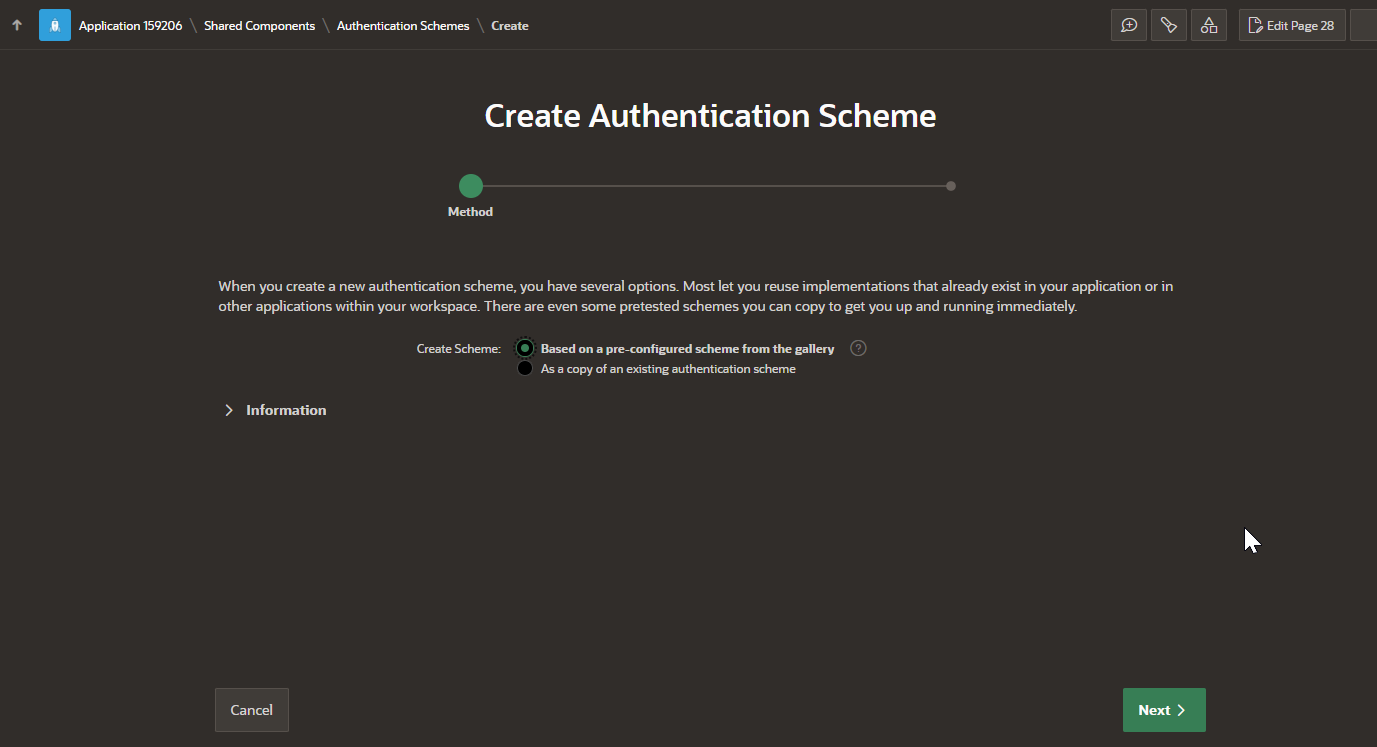
When creating an authentication scheme in APEX, developers can choose from a list of preconfigured authentication schemes that follow standard authentication and session management behaviors. Once a new authentication scheme is created, it must be explicitly enabled by setting it as the current scheme in the application's authentication settings.

Types of Authentication Schemes in Oracle APEX

Oracle APEX provides several preconfigured authentication schemes. Each scheme is designed for different use cases, ranging from simple user logins to enterprise-level authentication methods.

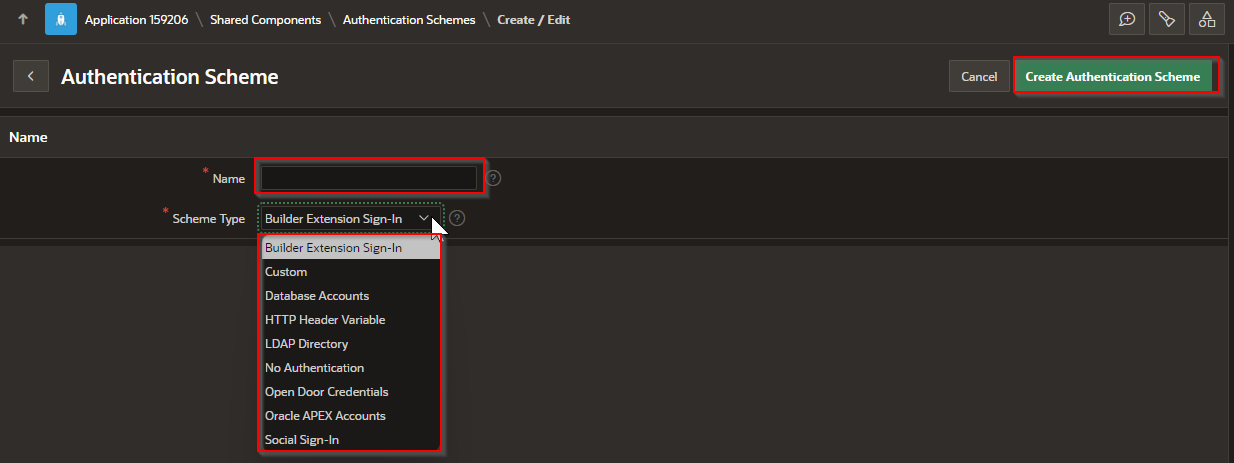
Builder Extension Sign-In

The Builder Extension Sign-In authentication scheme allows users to access an Extension App without requiring a separate login if they are already authenticated in an active APEX session. This method leverages existing APEX authentication to streamline access to related applications.

Custom Authentication

A Custom Authentication scheme gives developers full control over the authentication process. This approach requires implementing custom PL/SQL code to validate user credentials and manage authentication logic. It is useful when integrating with proprietary authentication mechanisms or when additional validation steps are required.

Database Accounts

The Database Accounts authentication scheme validates users against Oracle database schema accounts. Users must provide database credentials to log in, making this method suitable for internal applications where database-level security is required.

HTTP Header Variable Authentication

This authentication scheme relies on an HTTP Header variable to authenticate users. The web server is responsible for setting the HTTP Header with the username, and APEX retrieves this value to establish the session. This approach is commonly used in environments where authentication is handled externally by a reverse proxy or single sign-on system.

LDAP Directory Authentication

With LDAP Directory Authentication, user credentials are validated against an external LDAP server. This scheme is widely used in enterprise environments where authentication is centralized in a directory service, such as Microsoft Active Directory or Oracle Internet Directory.

No Authentication (Using DAD)

The No Authentication (Using DAD) method assigns the current database user as the application user. This scheme is often used in combination with mod_plsql Database Access Descriptor (DAD) configurations that use basic authentication to establish a session. It allows applications to inherit authentication from the database session.

Open Door Credentials

The Open Door Credentials scheme provides an application login page that allows users to enter a username, but it does not enforce password authentication. This approach is useful for applications that do not require strict user identity verification.

Oracle APEX Accounts

The Oracle APEX Accounts authentication scheme relies on APEX's built-in user repository. User accounts are created and managed within APEX, and authentication is performed against these stored accounts. This method is commonly used in APEX applications where authentication needs to be handled internally.

Oracle Application Server Single Sign-On (SSO)

This authentication scheme delegates authentication to the Oracle Application Server Single Sign-On (SSO) service. To use this scheme, the application must be registered as a partner application with the Oracle SSO server. This approach enables seamless authentication for users who are already logged into the enterprise's SSO environment.

SAML Sign-In Authentication

With SAML Sign-In, authentication is handled through Security Assertion Markup Language (SAML), a widely used protocol for single sign-on (SSO) in enterprise applications. This scheme is useful for integrating APEX applications with identity providers that support SAML-based authentication, such as Okta, Microsoft Entra ID (Azure AD), and other SAML 2.0-compliant providers.

Social Sign-In Authentication

The Social Sign-In authentication scheme enables users to log in using social network credentials or enterprise identity providers that support OpenID Connect or OAuth2 standards. This includes authentication through Google, Facebook, Microsoft, and other OAuth2-compliant services.

Configuring an Authentication Scheme in Oracle APEX

To set up authentication for an application:

  1. Open Oracle APEX and navigate to the Application Builder.

  2. Select the application where authentication needs to be configured.

  3. Go to Shared Components and select Authentication Schemes under the Security section.

  4. Click Create and choose one of the preconfigured authentication schemes.

  5. Configure the required settings based on the selected authentication method.

  6. Save the configuration and click Make Current Scheme to activate it.

By setting up an authentication scheme, developers can control how users log into their applications and enforce security policies appropriate for their organization's requirements.

Step 1 – Navigate to Application \ Shared Components \ authentication Schemes and press “Create”

A black box with yellow and green text

AI-generated content may be incorrect.

Step 2 – follow the wizard

A screenshot of a computer

Description automatically generated

Step 3 – name the schema , select the type and Complete

A screenshot of a computer

Description automatically generated

Mastering authentication schemes enables you to protect sensitive data and functionality by enforcing appropriate user access controls. By carefully selecting and configuring the right authentication method, you can enhance the security and user experience of your application. Whether using Oracle’s native authentication or integrating external identity providers, understanding these schemes helps you build trustworthy, scalable applications that meet organizational security requirements.

UI Defaults

 In Oracle APEX, User Interface (UI) Defaults are a set of metadata-driven, table- and column-scoped attributes that APEX consults when it g...