Adding a delay or timer function in Oracle APEX using PL/SQL can be useful in various scenarios, such as simulating processing time, pacing background jobs, or controlling the flow of certain operations. One common requirement is to implement a simple 5-second pause in your PL/SQL code. This can be achieved efficiently using built-in PL/SQL features, enabling you to introduce timed waits without impacting overall application performance.
In Oracle APEX, adding a 5-second timer function using PL/SQL can be done primarily with the built-in DBMS_LOCK.SLEEP procedure. This procedure pauses the execution of your PL/SQL code for a specified number of seconds, allowing you to introduce a delay or wait period as part of your application logic.
Steps to Add a 5-Second Timer Using PL/SQL in Oracle APEX
-
Identify where to add the timer:
The timer can be added inside any PL/SQL block, such as a process, a computation, a validation, or a dynamic action that executes PL/SQL code. -
Use the DBMS_LOCK.SLEEP procedure:
The syntax is simple:DBMS_LOCK.SLEEP(seconds => 5);This command tells Oracle to pause the execution for 5 seconds.
-
Example of adding a 5-second delay in a Process:
-
Go to your APEX application and open the Page Designer.
-
Under the “Processing” section, create a new Process or edit an existing one where you want to add the delay.
-
In the PL/SQL Code section, add the following code snippet:
BEGIN
   -- Your logic before the delay
   DBMS_LOCK.SLEEP(5); -- Pause for 5 seconds
   -- Your logic after the delay
END;
This will cause the process to wait 5 seconds before continuing.
-
-
Using the Timer in Dynamic Actions:
You can also create a Dynamic Action that executes PL/SQL code and includes the sleep timer to control the timing of actions on the page. -
Considerations:
-
Avoid using unnecessary delays in UI-interactive code to maintain a responsive user experience.
-
Using
DBMS_LOCK.SLEEPin server-side processes is best suited for scenarios such as throttling background jobs or simulating wait times during development. -
Ensure the user is aware if a delay affects the UI, possibly using loading indicators.
-
By using the DBMS_LOCK.SLEEP function, you can precisely control execution timing in Oracle APEX, making it easy to add pauses like a 5-second timer in your PL/SQL code blocks.
Example
A timer function in APEX can be useful for delaying actions such as refreshing reports, executing processes, or redirecting users. Since PL/SQL executes on the server, implementing a 5-second delay requires using DBMS_LOCK.SLEEP or DBMS_SESSION.SLEEP.
Method 1: Using DBMS_LOCK.SLEEP in a PL/SQL Process
The DBMS_LOCK.SLEEP procedure pauses execution for a given number of seconds.
Steps to Implement
Create a PL/SQL Process
In Page Designer, go to Processing > Click Create Process
Set Execution Point to After Submit
Set Language to PL/SQL
Enter the following code:
BEGIN
DBMS_LOCK.SLEEP(5); -- Wait for 5 seconds
END;
Save and Test
Submit the page and observe the 5-second delay before the next action executes.
Method 2: Using JavaScript to Delay a Dynamic Action
If you want the delay to occur without blocking other processes, use JavaScript instead of PL/SQL.
Steps to Implement
Create a Dynamic Action
Event: Click (on a button)
Action: Execute JavaScript Code
Code:
setTimeout(function() {
apex.submit("SAVE"); // Simulate form submission after 5 seconds
}, 5000);
Save and Test
When the button is clicked, APEX will wait 5 seconds before submitting.
Method 3: Using DBMS_SESSION.SLEEP in a PL/SQL Block
DBMS_SESSION.SLEEP is another alternative to DBMS_LOCK.SLEEP but works in anonymous PL/SQL blocks.
Example Usage
BEGIN
DBMS_SESSION.SLEEP(5); -- Wait for 5 seconds
END;
This can be placed in a Before Header Process if you need to delay page processing.
Best Practices
Avoid using PL/SQL sleep functions excessively, as they can block database resources.
Use JavaScript for UI-related delays, since it does not block the session.
Ensure long delays are necessary, as they can impact user experience.
Adding a 5-second timer in APEX can be done using PL/SQL (DBMS_LOCK.SLEEP, DBMS_SESSION.SLEEP) or JavaScript (setTimeout) depending on whether the delay is needed for server-side or client-side processing.
EXAMPLE:
Create or replace function "SLEEP5SECS" return number as
l_now timestamp := systimestamp;
l_end_time timestamp;
begin
l_end_time := l_now + numtodsinterval (5, 'second');
while(l_end_time > l_now) loop
l_now := systimestamp;
end loop;
return 0;
end "SLEEP5SECS";
/
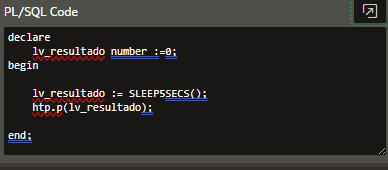
Call it from a PL/SQL Source
declare
lv_resultado number :=0;
begin
lv_resultado := SLEEP5SECS();
htp.p(lv_resultado);
end;
Incorporating a 5-second timer in your PL/SQL code within Oracle APEX is straightforward and can enhance your application's control flow where timing is essential. By using simple techniques like DBMS_LOCK.SLEEP, you can add precise delays that help manage processing or user interactions smoothly. This approach keeps your application responsive while meeting timing requirements effectively.

