Search This Blog

Tuesday, June 24, 2025

How Do I Sort with apex_t_varchar2 in Oracle SQL in APEX

 apex_t_varchar2 is a built-in PL/SQL table type used in Oracle APEX to store and process arrays of strings. It is commonly used when handling collections, multi-value parameters, or returning datasets from functions. However, since it is an associative array, it does not have built-in sorting mechanisms like SQL queries do.

This tutorial will show different methods to sort an apex_t_varchar2 array in Oracle SQL within an APEX application.


Creating and Using apex_t_varchar2

Declaring and Populating an apex_t_varchar2 Array

In PL/SQL, you can declare an apex_t_varchar2 array and manually insert values into it.

DECLARE  

    l_names apex_t_varchar2 := apex_t_varchar2();  

BEGIN  

    l_names.EXTEND(5);  

    l_names(1) := 'Charlie';  

    l_names(2) := 'Alice';  

    l_names(3) := 'Eve';  

    l_names(4) := 'Bob';  

    l_names(5) := 'David';  

END;

/

This creates an unsorted array with five values.


Sorting apex_t_varchar2 Using SQL Table Functions

Since apex_t_varchar2 is a PL/SQL collection, it does not support ORDER BY directly in SQL. However, we can use table functions to convert the collection into a table and apply sorting.

Step 1: Create a Table Function

A table function is a PL/SQL function that returns a table-like structure that SQL queries can process.

CREATE OR REPLACE FUNCTION sort_varchar2_array (  

    p_array apex_t_varchar2  

) RETURN TABLE OF VARCHAR2(4000)  

PIPELINED  

IS  

BEGIN  

    FOR i IN 1 .. p_array.COUNT LOOP  

        PIPE ROW (p_array(i));  

    END LOOP;  

    RETURN;  

END sort_varchar2_array;

/

  • This function iterates over the array and returns each row.

  • The PIPELINED keyword allows the function to be used in SQL queries.

Step 2: Use the Function to Sort

Now, you can call the function in an SQL query and sort the output.

DECLARE  

    l_names apex_t_varchar2 := apex_t_varchar2();  

BEGIN  

    l_names.EXTEND(5);  

    l_names(1) := 'Charlie';  

    l_names(2) := 'Alice';  

    l_names(3) := 'Eve';  

    l_names(4) := 'Bob';  

    l_names(5) := 'David';  


    -- Query the function and apply sorting  

    FOR rec IN (SELECT COLUMN_VALUE AS name  

                FROM TABLE(sort_varchar2_array(l_names))  

                ORDER BY name)  

    LOOP  

        DBMS_OUTPUT.PUT_LINE(rec.name);  

    END LOOP;  

END;

/

This will output:

Alice  

Bob  

Charlie  

David  

Eve  

The names are now sorted alphabetically.


Sorting apex_t_varchar2 Manually Using PL/SQL

If you need to sort the array within PL/SQL without converting it into a table, you can use a nested loop sorting algorithm like Bubble Sort or QuickSort.

Example: Bubble Sort in PL/SQL

DECLARE  

    l_names apex_t_varchar2 := apex_t_varchar2();  

    temp VARCHAR2(100);  

BEGIN  

    l_names.EXTEND(5);  

    l_names(1) := 'Charlie';  

    l_names(2) := 'Alice';  

    l_names(3) := 'Eve';  

    l_names(4) := 'Bob';  

    l_names(5) := 'David';  


    -- Bubble Sort Algorithm  

    FOR i IN 1 .. l_names.COUNT LOOP  

        FOR j IN 1 .. l_names.COUNT - 1 LOOP  

            IF l_names(j) > l_names(j + 1) THEN  

                temp := l_names(j);  

                l_names(j) := l_names(j + 1);  

                l_names(j + 1) := temp;  

            END IF;  

        END LOOP;  

    END LOOP;  


    -- Display Sorted Results  

    FOR i IN 1 .. l_names.COUNT LOOP  

        DBMS_OUTPUT.PUT_LINE(l_names(i));  

    END LOOP;  

END;

/


This method is slower but works without a table function.


When to Use These Sorting Methods

Sorting Method

Best Use Case

Table Function + SQL Sorting

When integrating with SQL queries

Manual Bubble Sort

When working strictly within PL/SQL

In-memory Sorting

When performance is not critical


For APEX applications, using table functions is the best option, as it allows sorting within interactive reports, faceted searches, and other UI components.

Making the Primary Key Sequential in Oracle SQL in APEX

 A primary key is a unique identifier for each row in a table. To ensure that new records receive a sequential primary key value, you can use an Oracle sequence and a trigger or an identity column. Oracle APEX, which operates on top of an Oracle Database, supports both approaches.


Using a Sequence and a Trigger

A sequence is an Oracle database object that generates unique numbers in a specific order. A trigger automatically assigns the next value from the sequence before an insert operation.

Steps to Create a Sequential Primary Key

  1. Create a Table Without Defining the Primary Key as an Identity Column

CREATE TABLE employees (

    id NUMBER PRIMARY KEY,

    first_name VARCHAR2(50),

    last_name VARCHAR2(50),

    email VARCHAR2(100)

);

The id column is the primary key but does not yet have an automatic way to generate values.

  1. Create a Sequence to Generate Sequential Values

CREATE SEQUENCE employees_seq

START WITH 1

INCREMENT BY 1

NOCACHE

NOCYCLE;

  • START WITH 1: The sequence starts from 1.

  • INCREMENT BY 1: Each new value increases by 1.

  • NOCACHE: Prevents preallocating values, ensuring sequential assignment.

  • NOCYCLE: Ensures the sequence does not restart after reaching the maximum value.

  1. Create a Trigger to Automatically Assign the Next Value

CREATE OR REPLACE TRIGGER employees_trigger

BEFORE INSERT ON employees

FOR EACH ROW

BEGIN

    IF :NEW.id IS NULL THEN

        SELECT employees_seq.NEXTVAL INTO :NEW.id FROM dual;

    END IF;

END;

/

  • The trigger runs before an INSERT operation.

  • If id is NULL, the next sequence value is assigned automatically.

  1. Insert Data Without Manually Assigning the Primary Key

INSERT INTO employees (first_name, last_name, email)  

VALUES ('John', 'Doe', 'john.doe@example.com');  

The database automatically assigns the next sequential value to the id column.

  1. Verify That the Primary Key Is Incrementing Sequentially

SELECT * FROM employees ORDER BY id;

Each new record will have a sequential id.


Using an Identity Column (Oracle 12c and Later)

For newer versions of Oracle (12c and above), you can use the identity column feature to automatically generate sequential primary keys.

Steps to Create a Table with an Identity Column

  1. Create the Table Using an Identity Column

CREATE TABLE employees (

    id NUMBER GENERATED ALWAYS AS IDENTITY PRIMARY KEY,

    first_name VARCHAR2(50),

    last_name VARCHAR2(50),

    email VARCHAR2(100)

);

  • GENERATED ALWAYS AS IDENTITY: Automatically generates a sequential value for each new row.

  • PRIMARY KEY: Ensures uniqueness.

  1. Insert Data Without Specifying the Primary Key

INSERT INTO employees (first_name, last_name, email)  

VALUES ('Jane', 'Smith', 'jane.smith@example.com');  

Oracle automatically assigns the next available id value.

  1. Check the Assigned Primary Key Values

SELECT * FROM employees ORDER BY id;

The id values will be sequentially increasing.


Choosing Between a Sequence + Trigger vs. Identity Column

Feature

Sequence + Trigger

Identity Column

Oracle Version

Works on all versions

Oracle 12c+

Flexibility

More control over values

Simpler setup

Manual Override

Can insert custom values

Restricted unless BY DEFAULT is used

Performance

Slightly more overhead

More efficient


For new applications running on Oracle 12c or later, using an identity column is the recommended approach. However, if you need to manually control primary key assignment or are working with an older Oracle version, using a sequence and trigger is a reliable alternative.


Additional Examples

The method requires the use of Sequence-

EXAMPLE Method #1- Manually

CREATE SEQUENCE  "CA_AUTH"  MINVALUE 1 MAXVALUE 999999999999999999 INCREMENT BY 1 START WITH 1 CACHE 2 NOORDER  NOCYCLE  NOKEEP  NOSCALE  GLOBAL ;


UPDATE tableName SET columnName = sequenceName.NEXTVAL


EXAMPLE Method #2 – Via APEX Object Browser

Step -1

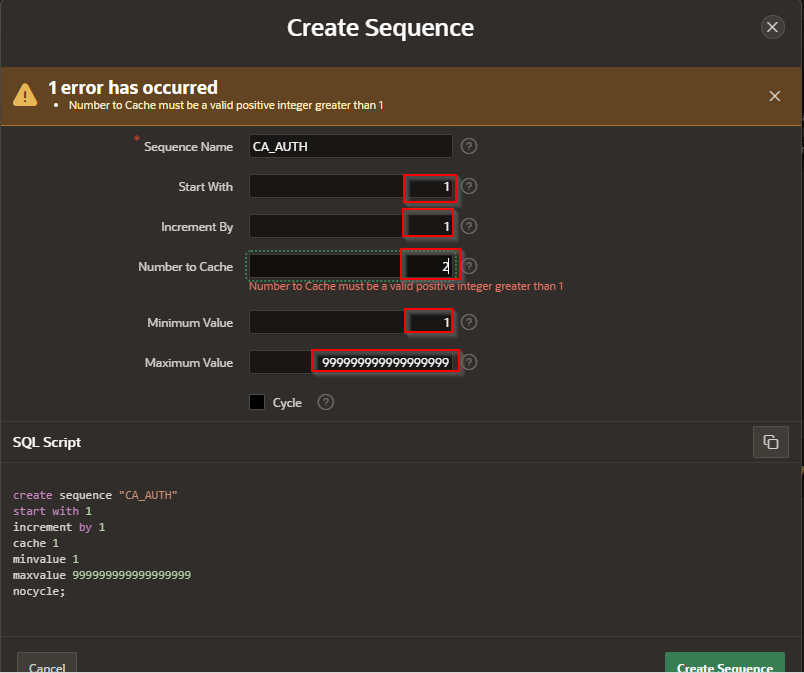
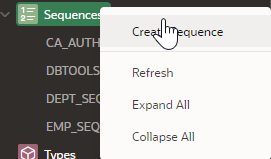
Object Browser > Sequence > Create Sequence

A screen shot of a computer

Description automatically generated


Step -2

A screenshot of a computer

AI-generated content may be incorrect.


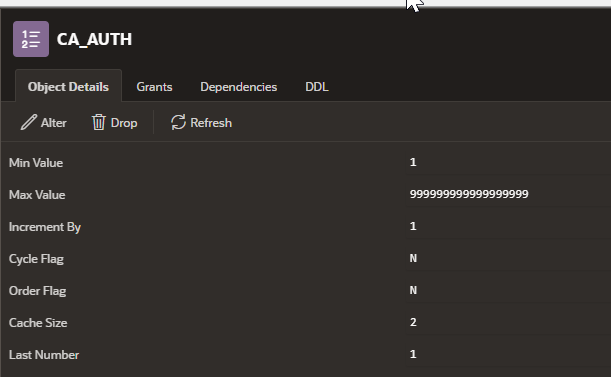
Completed

A screenshot of a computer

Description automatically generated

Step 3- 

UPDATE tableName SET columnName = sequenceName.NEXTVAL


UI Defaults

 In Oracle APEX, User Interface (UI) Defaults are a set of metadata-driven, table- and column-scoped attributes that APEX consults when it g...